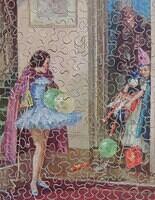
Puzzle
Here we find the all important building block upon which the entire Jigasaurus website has been built. The individual jigsaw puzzle album! Within this should be a short description of the puzzle, including the material of which it is made, some description of the style in which it has been cut, plus such information as its likely date of origin and artist information, if applicable. Here also will be the images, so key to the presentation of the whole site.
The order in which the images are uploaded is an important consideration at this point and should be executed with a degree of care. Please take your time to look at the layout within this album and use it for guidance. Whilst the images can be rearranged later, it seems good practice to try and place them correctly on set up.
Within the "Tags (comma separated)" field, found in the "edit album" screen, there is the opportunity to select those "Tags" most suited to describe your puzzle artwork. Only through this important process of adding tags does your entry display correctly within the Jigasaurus, show up in the records as a "Recent Album" and become likely to be found in the various search functions available to visitors to the site. If you add new Tags please let the Gallery Administrator know, as these new Tags will need to be manually added to the Gallery database to be included in various Custom Views such as Recent Albums, Modified Albums etc.
Here is an example for a "Puzzle" album layout:
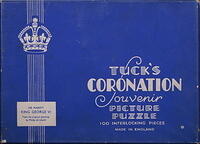
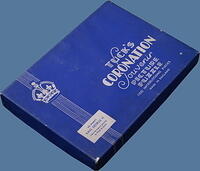
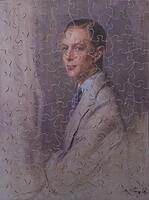
Companion puzzle to that of Her Majesty Queen Elizabeth, also painted by Philip Alexius de Lászlò in 1931, but used by Tuck for this superb and very scarce plywood jigsaw puzzle, issued in 1937 to commemorate the Coronation.
Artist: Lászlò, Philip Alexius de
Date: 1937
Brand: Tuck, Raphael and Sons Ltd
Material: Plywood
Nationality: British-England
Pieces: 100
Size: 7 1/2" x 10 1/4"
Theme: Royalty
Title: Coronation Souvenir Picture Puzzle-His Majesty King George VI
The order in which the images are uploaded is an important consideration at this point and should be executed with a degree of care. Please take your time to look at the layout within this album and use it for guidance. Whilst the images can be rearranged later, it seems good practice to try and place them correctly on set up.
Within the "Tags (comma separated)" field, found in the "edit album" screen, there is the opportunity to select those "Tags" most suited to describe your puzzle artwork. Only through this important process of adding tags does your entry display correctly within the Jigasaurus, show up in the records as a "Recent Album" and become likely to be found in the various search functions available to visitors to the site. If you add new Tags please let the Gallery Administrator know, as these new Tags will need to be manually added to the Gallery database to be included in various Custom Views such as Recent Albums, Modified Albums etc.
Here is an example for a "Puzzle" album layout:
Companion puzzle to that of Her Majesty Queen Elizabeth, also painted by Philip Alexius de Lászlò in 1931, but used by Tuck for this superb and very scarce plywood jigsaw puzzle, issued in 1937 to commemorate the Coronation.
Artist: Lászlò, Philip Alexius de
Date: 1937
Brand: Tuck, Raphael and Sons Ltd
Material: Plywood
Nationality: British-England
Pieces: 100
Size: 7 1/2" x 10 1/4"
Theme: Royalty
Title: Coronation Souvenir Picture Puzzle-His Majesty King George VI


© 2008-2025 David Shearer
Album info
Album Tree
Random image